Ethernet Port
Note: This page has been available as Port Management since firmware v4.7, and was renamed to Ethernet Port in firmware v4.8.3.
On the left side of the web Admin Panel, go to NETWORK -> Port Management or Ethernet Port.
It allows you to manage Ethernet port roles (WAN/LAN) and view port details such as MAC address and negotiated speed.
WAN
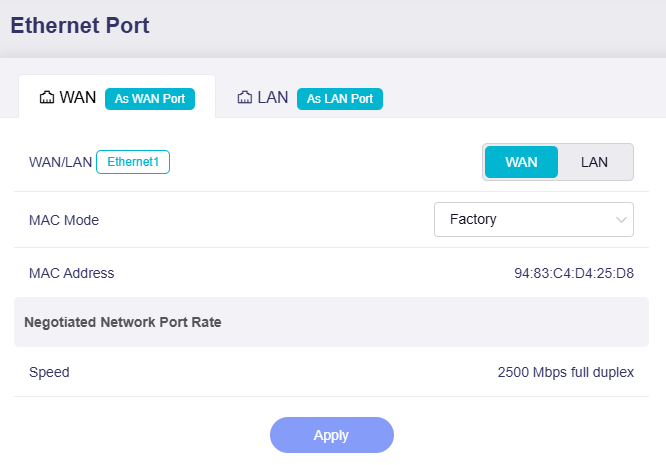
This section displays the port role (WAN or LAN), MAC address, and negotiated rate.
-
WAN/LAN: The current operating mode of the physical WAN port. You can set it to LAN as needed.
-
MAC Mode: Defaults to Factory Mode. You can switch it to Clone Mode or Random Mode.
-
Mac Address: The MAC address of the WAN interface.
-
Negotiated Network Port Rate: The negotiated link speed of the WAN interface, displayed only when a valid link is detected.
LAN
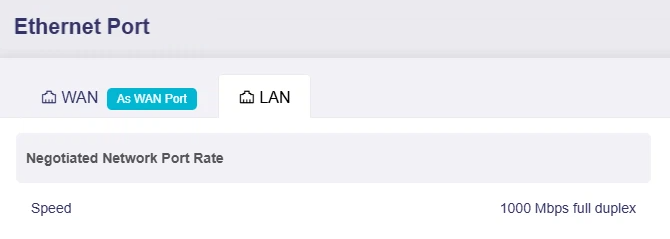
This section displays the negotiated speed of the LAN port. It is only displayed when a valid link is detected.
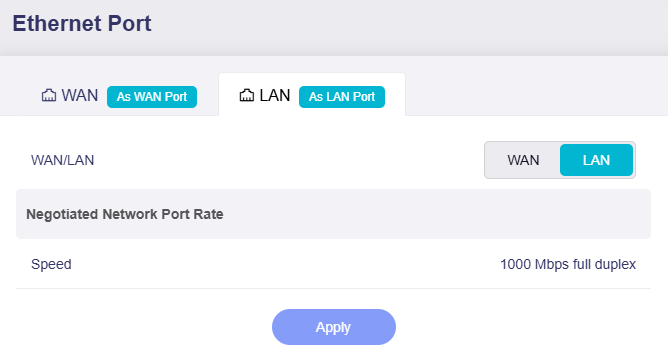
Some models support switching LAN 1 to a WAN port for dual-Ethernet WAN scenario. You can switch the LAN port role as shown below. Click here for details.
Still have questions? Visit our Community Forum or Contact us.