SQM (Smart Queue Management)
SQM (Smart Queue Management) intelligently manages your router's network traffic to minimize latency and "bufferbloat", ensuring smoother gaming and voice calls.
Note:
-
This feature affects traffic passing through the router as a gateway (including local client traffic and VPN Client traffic) but not incoming traffic when the router acts as a VPN Server.
-
Since SQM is resource-intensive, it works best for low-bandwidth or congested networks. Enabling it on high-speed connections may reduce peak throughput.
Supported Models
Supported Models
- GL-BE10000 (Slate 7 Pro)
- GL-MT5000 (Brume 3)
Quick Setup
On the left side of the web Admin Panel, go to FLOW CONTROL -> SQM.
Toggle the switch to enable SQM, and set your maximum upload and download speeds (input range: 1 - 10000) for traffic scheduling. Match them to your actual internet bandwidth for the best results.
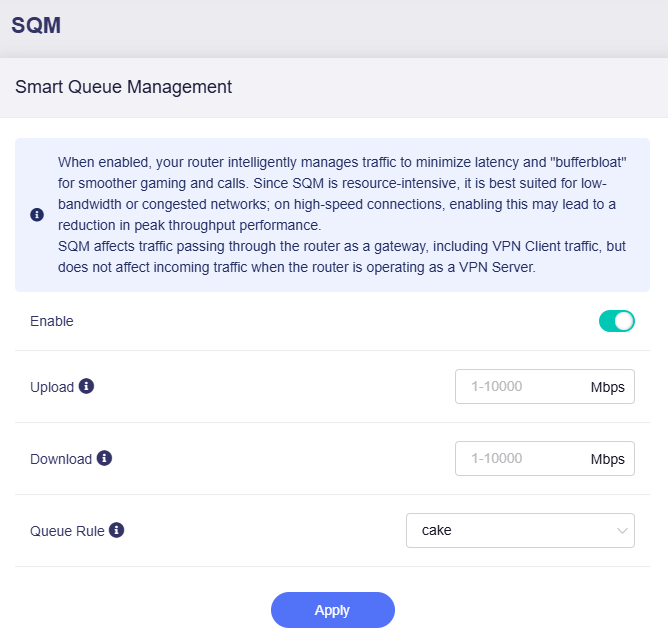
Note: Values entered in the input field are in Mbps (megabits per second). The equivalent MB/s (megabytes per second) is displayed for your reference.

For Queue Rule, two options are available:
-
cake: Smart, automatic traffic shaping with superior overall latency control (recommended).
-
fq_codel: Simple, efficient fair queueing with basic latency reduction.
Still have questions? Visit our Community Forum or Contact us.