Collie (GL-X300B) User Guide
Product overview
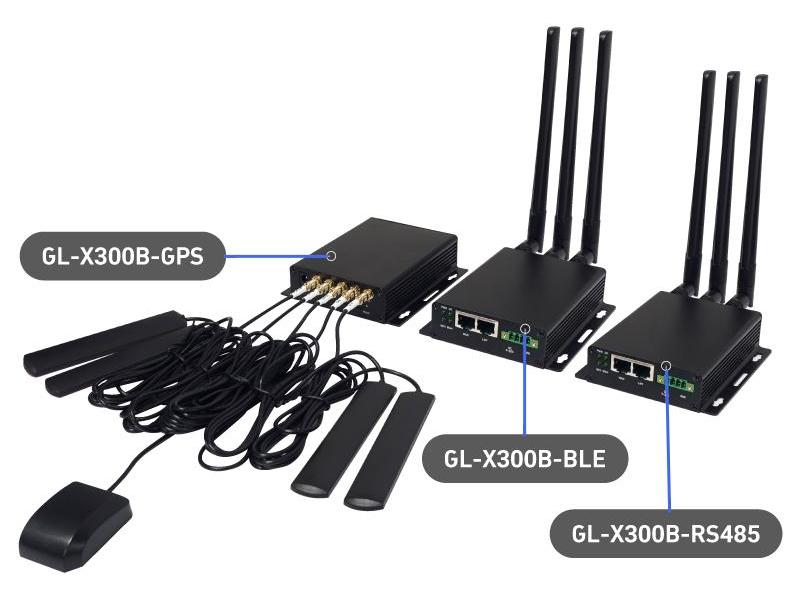
Collie (GL-X300B) is an industrial cellular gateway designed to operate under high temperatures and scenarios with potential physical hazards. There are three versions of Collie, designed to operate in indoor stationary facilities (GL-X300B-RS485 / GL-X300B-BLE), or in transportation vehicles (GL-X300B-GPS). Collie is perfect for machine-to-machine communications between electrical devices in high electrical noise environments.

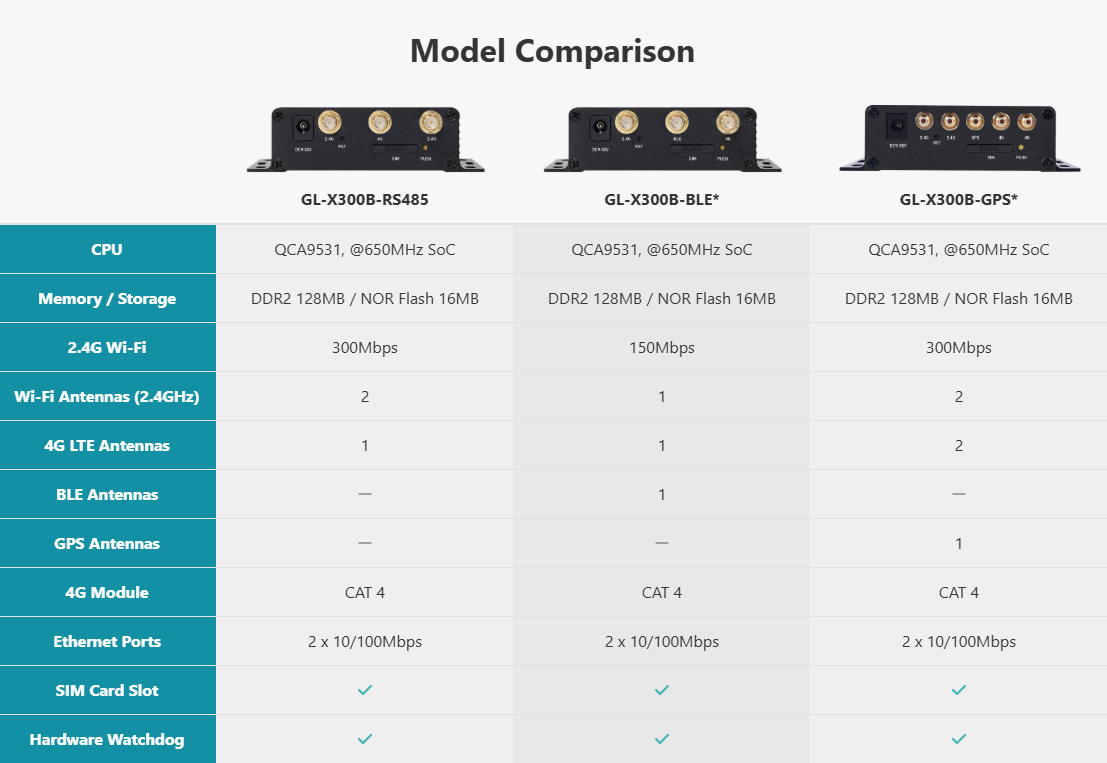
What's the difference between GL-X300B-RS485, GL-X300B-BLE, and GL-X300B-GPS?
-
GL-X300B-RS485 includes an RS485 chip with RS485 interface. The module supports bi-directional data transmission of various devices in the field of industrial automation and IoT, thus realizing the functions of data acquisition, control and monitoring.
-
GL-X300B-BLE is equipped with three external omnidirectional antennas for 2.4GHz Wi-Fi, 4G LTE, and BLE communication, receiving signals from all directions, and providing high flexibility in installation placement within an industrial environment.
-
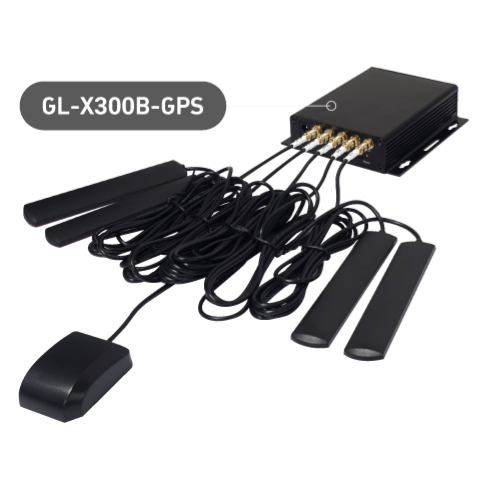
GL-X300B-GPS is equipped with five external antennas, including two 2.4GHz Wi-Fi, two 4G LTE, and one GPS Antenna. The extendable wired antennas are perfect for having multiple reception placements within a vehicle, minimizing reception black spots when traveling through high network density cities.
Note
The BLE and GPS versions are available with a minimum order quantity.
Select the correct antenna connector according to your device version. Incompatible connectors may cause antenna malfunction or abnormal signal performance. Antenna interfaces for each version are listed below:
- X300B‑GPS: 5 x SMB male connectors
- X300B‑RS485: 2 x RP‑SMA female connectors, 1 x SMA female connector
- X300B‑BLE: 3 x RP‑SMA female connectors
The antenna must use a mating‑type connector. Use a female‑connector antenna when the device port is male, and a male‑connector antenna when the device port is female.
Package contents
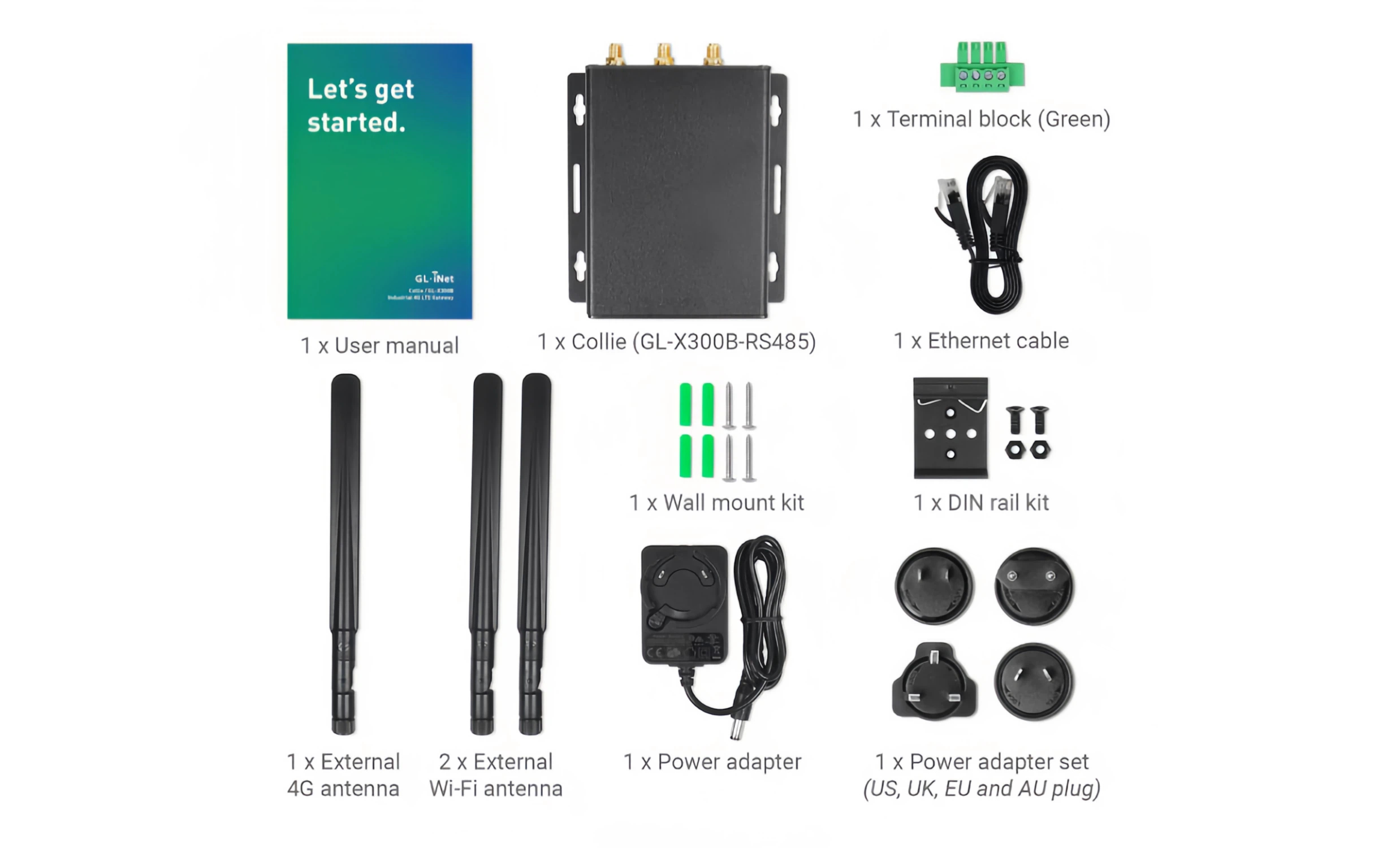
- 1 x User manual
- 1 x Collie (GL-X300B-RS485) (2-year Warranty)
- 1 x Ethernet cable
- 1 x External 4G antenna
- 2 x External Wi-Fi antenna
- 1 x Terminal block (Green)
- 1 x Wall mount kit
- 1 x DIN rail kit
- 1 x Power adapter
- 4 x Converters (US, UK, EU and AU plugs) (three-month Warranty)
Specifications
Antenna Installation
GL-X300B-RS485
Collie (GL-X300B-RS485) comes with the following antennas:
- 1 x External 4G antenna
- 2 x External Wi-Fi antennas (2.4GHz)
Follow these steps to install the antennas.
-
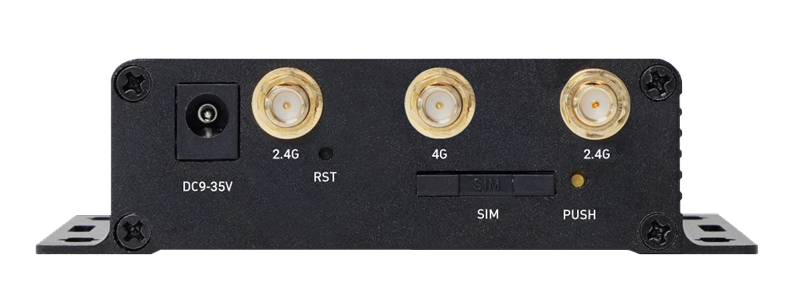
Attach the antennas (in no particular order).
- Attach the two identical Wi-Fi antennas to the 2.4G ports.
- Attach the single 4G antenna to the 4G port.
-
Position the antennas upwards for optimal performance.
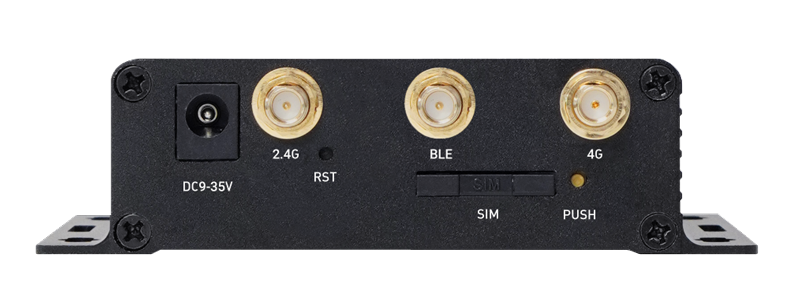
GL-X300B-BLE
Collie (GL-X300B-BLE) comes with the following antennas:
- 1 x External 4G antenna
- 1 x External Wi-Fi antenna (2.4GHz)
- 1 x External BLE antenna
Follow these steps to install the antennas.
-
Attach the antennas (in no particular order).
- Attach the single Wi-Fi antennas to the 2.4G port.
- Attach the single 4G antenna to the 4G port.
- Attach the single BLE antenna to the BLE port.
-
Position the antennas upwards for optimal performance.
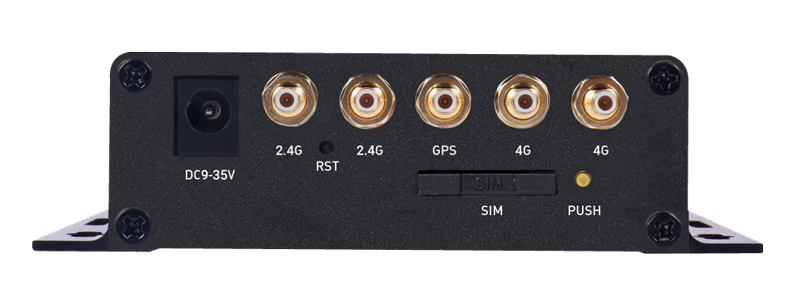
GL-X300B-GPS
Collie (GL-X300B-GPS) comes with the following antennas:
- 2 x External 4G antennas
- 2 x External Wi-Fi antennas (2.4GHz)
- 1 x External GPS antenna
Follow these steps to install the antennas.
-
Attach the antennas (in no particular order).
- Attach the two identical Wi-Fi antennas to the 2.4G ports.
- Attach the two identical 4G antenna to the 4G ports.
- Attach the single GPS antenna to the GPS port.
-
Position the antennas correctly and prevent tangling to ensure optimal performance.
First-time setup
All GL.iNet routers have a similar setup process. Click here to learn about the first-time setup.
INTERNET
Log in to the router's web Admin Panel, and navigate to INTERNET from the left-side menu.
This page allows you to select your internet connection type, such as Ethernet, Repeater, Tethering, and Cellular, depending on your model.
For Collie (GL-X300B), it supports three types of connection type: Ethernet, Repeater, and Cellular.
Ethernet
Connect your router to an active modem or an active network device via an Ethernet cable to access the Internet. This method usually provides the fastest and most reliable Internet connection.
Click here to learn how to connect to the internet via an ethernet cable

Repeater
Set up your router as a repeater to extend the Wi-Fi coverage of an existing Wi-Fi network. As a repeater, it receives and retransmits wireless signals within its range, thereby extending its coverage. This method is useful when a single router cannot cover the entire usage area.
Click here to learn how to connect to the internet via an existing Wi-Fi

Cellular
Insert a SIM card into the router's SIM card slot to connect it to the internet. This method is useful for sharing internet access from a single SIM card to all connected devices.
Click here to learn how to connect to the internet via cellular

Multi-WAN
Multi-WAN is a networking feature that allows you to set up your router with multiple internet connections (e.g., Ethernet, Repeater, and Cellular) at the same time. If the top-priority internet connection fails, the router will automatically switch to another internet connection. This is also called Failover, ensuring smooth and uninterrupted internet access.
Go to Multi-WAN to set the priority of each Internet connection.
Alternatively, you can switch the Multi-WAN mode from Failover to Load Balance, which enables you to use multiple network interfaces at the same time to increase the total bandwidth of the router.
WIRELESS
The wireless settings lets users manage network security of the primary Wi-Fi and the Guest Wi-Fi, it is accessible by going to WIRELESS on the side menu.
Click here to learn more about the wireless configuration
CLIENTS
Clients are devices connected to the router, you can block clients or limit its network speed. The interface is accessible by clicking CLIENTS in the side menu of the router's Admin Panel.
Click here to learn more about managing your device clients.
VPN
GL.iNet routers are pre-installed with OpenVPN and WireGuard® supporting 30+ VPN services. When the VPN client is enabled, the router can encrypt traffic for devices on the network, including devices that cannot run VPN apps, according to your VPN policy settings. Our routers can also act as VPN servers, redirecting traffic from client devices in remote locations to the VPN server via a VPN tunnel before accessing the public internet.
VPN Dashboard
OpenVPN
Please refer to the following links for a step to step setup guide:
WireGuard
Please refer to the following links for a step to step setup guide:
APPLICATIONS
GL.iNet routers include a wide range of add-on features that simplifies device management, improves user's internet experience, automates firmware update, and more.
Plug-ins
Please visit the Plug-ins tutorial.
Dynamic DNS
Please visit the Dynamic DNS tutorial.
GoodCloud
Please visit the GoodCloud tutorial.
NETWORK
Firewall
GL.iNet's routers include multiple firewall features to ensure a secure connection and complete oversight by users. It lets users configure firewall rules including Port Forwarding, Open Ports, and DMZ.
Click here to learn more about GL.iNet routers' firewall
Multi-WAN
Please visit the Multi-WAN tutorial.
LAN
Please visit the LAN tutorial.
DNS
Please visit the DNS tutorial.
Network Mode
Please visit the Network Mode tutorial.
IPv6
Please visit the IPv6 tutorial.
MAC Address
The Mac Address page was previously called Mac Clone and has been changed to Mac Address since v4.2.
Please visit the MAC Address tutorial.
Drop-in Gateway
Please visit the Drop-in Gateway tutorial.
IGMP Snooping
Please visit the IGMP Snooping tutorial.
SYSTEM
Overview
Please visit the System Overview tutorial.
Upgrade
GL.iNet provides regular updates on our routers' firmware to improve performance, resolving bugs and fix vulnerabilities.
Please visit the Upgrade tutorial.
Scheduled Tasks
Please visit the Scheduled Tasks tutorial.
Admin Password
This feature has been moved to Security since v4.5.
Please visit the Admin Password tutorial.
Time Zone
Please visit the Time Zone tutorial.
Log
Please visit the Log tutorial.
Security
This feature is available since v4.5.
Please visit the Security tutorial.
Reset Firmware
Please visit the Reset Firmware tutorial.
Advanced Settings
Please visit the Advanced Settings tutorial.
Regulatory Statements
FCC ID: 2AFIW-X300B
-
This device complies with Part 15 of the FCC Rules. Operation is subject to the following two conditions:
(1) This device may not cause harmful interference, and
(2) This device must accept any interference received, including interference that may cause undesired operation. -
Changes or modifications not expressly approved by the party responsible for compliance could void the user's authority to operate the equipment.
-
Note: This equipment has been tested and found to comply with the limits for a Class B digital device, pursuant to part 15 of the FCC Rules. These limits are designed to provide reasonable protection against harmful interference in a residential installation. This equipment generates uses and can radiate radio frequency energy and, if not installed and used in accordance with the instructions, may cause harmful interference to radio communications. However, there is no guarantee that interference will not occur in a particular installation. If this equipment does cause harmful interference to radio or television reception, which can be determined by turning the equipment off and on, and the user is encouraged to try to correct the interference by one or more of the following measures:
- Reorient or relocate the receiving antenna.
- Increase the separation between the equipment and receiver.
- Connect the equipment into an outlet on a circuit different from that to which the receiver is connected.
- Consult the dealer or an experienced radio/TV technician for help important announcement.
FCC Radiation Exposure Statement
This equipment complies with FCC radiation exposure limits set forth for an uncontrolled environment. This equipment should be installed and operated with minimum distance 20cm between the radiator and your body. This transmitter must not be co-located oroperating in conjunction with any other antenna or transmitter.
Canadian Compliance Statement
This device contains licence-exempt transmitter(s)/receiver(s) that comply with Innovation, Science and Economic Development Canada's licence-exempt RSS(s).
Operation is subject to the following two conditions:
(1) This device may not cause interference.
(2) This device must accept any interference, including interference that may cause undesired operation of the device.
L'émetteur/récepteur exempt de licence contenu dans le présent appareil est conforme aux CNR d'Innovation, Sciences et Développement économique Canada applicables aux appareils radio exempts de licence.
L'exploitation est autorisée aux deux conditions suivantes:
(1) L'appareil ne doit pas produire de brouillage;
(2) L'appareil doit accepter tout brouillage radioélectrique subi, même si le brouillage est susceptible d'en compromettre le fonctionnement.
This equipment complies with IC RSS-102 radiation exposure limits set forth for an uncontrolled environment. This equipment should be installed and operated with minimum distance 20cm between the radiator and your body.
Cet équipement est conforme aux limites d'exposition aux radiations IC CNR-102 établies pour un environnement non contrôlé. Cet équipement doit être installé et utilisé avec une distance minimale de 20 cm entre le radiateur et votre corps.
The user manual for LE-LAN devices shall contain instructions related to the restrictions mentioned in the above sections, namely that:
i. the device for operation in the band 5150-5250 MHz is only for indoor use to reduce the potential for harmful interference to co-channel mobile satellite systems;
i. le dispositif utilisé dans la bande 5150-5250 MHz est réservé à une utilisation en intérieur afin de réduire le risque de brouillage préjudiciable aux systèmes mobiles par satellite dans le même canal;
The functions of Wireless Access Systems including Radio Local Area Networks(WAS/RLANs) within the band 5150-5350 MHz for this device are restricted to indoor use only within all European Union countries.
Hereby, GL TECHNOLOGIES (HONG KONG) LIMITED declares that the radio equipment type [Industrial 4G LTE Gateway, GL-X300B] is in compliance with the essential requirements and other relevant provisions of Directive 2014/53/EU. The full text of the EU declaration of conformity is available at https://www.gl-inet.com/products/certificate.
FOR EU:
Maximum output power
CE: ≤20dBm EIRP (2.412GHz–2.472GHz); ≤23dBm EIRP (5.15GHz–5.35GHz); ≤30dBm EIRP (5.47GHz–5.725GHz); ≤13.98dBm EIRP (5.725GHz–5.85GHz)