Port Forwarding
Note: This guide applies to firmware v4.6 and above. For earlier versions, please refer to Firewall.
On the left side of the web Admin Panel, go to NETWORK -> Port Forwarding, or SECURITY -> Port Forwarding (for firmware v4.9 and above).
This page allows you to configure firewall rules, including DMZ and port forwarding.
DMZ
DMZ lets you to expose one computer to the Internet, so all inbound packets will be redirected to this computer.
Toggle on Enable DMZ. Select the internal IP address of your host device, which is going to receive all the inbound packets.
You can set the priority for the DMZ. If the DMZ priority is higher than the port forwarding rules, all port forwarding rules will be invalidated. Otherwise, requests will be forwarded to the DMZ Host device only if the accessed port has no corresponding port forwarding rule.

Port Forwarding
Port Forwarding lets remote computers connect to a local computer or server behind the router's firewall in the LAN (such as web servers, FTP servers, etc).
To set up port forwarding, click Add in the Port Forwarding section.

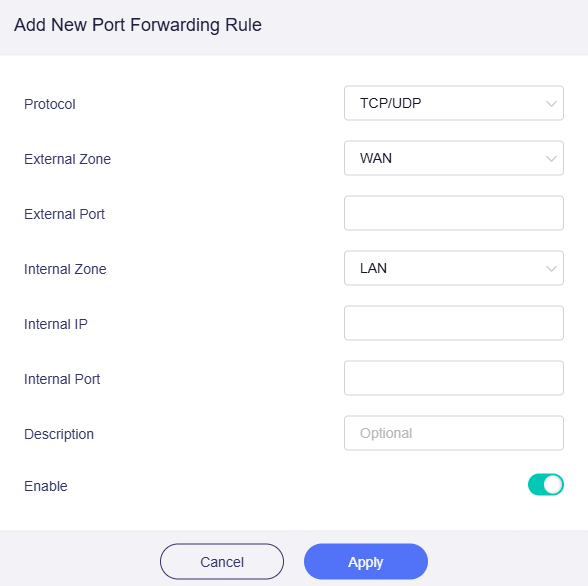
In the pop-up window, add a new port forwarding rule, and click Apply.
-
Protocol: Choose
TCP,UDP, or bothTCP and UDPfor this rule. -
External Zone: The options for external zone are
WAN,WireGuard Client,WireGuard Server,OpenVPN Client,OpenVPN Server,LAN,Guest. -
External Port: The numbers of external ports. You can enter a specific port number here. The port range is from 1 to 65535. You can set a single port or set the port range by concatenating the first and last port numbers with the - symbol (Such as 501-510).
-
Internal Zone: The options for internal zone are
LAN,Guest,WireGuard Client,WireGuard Server,OpenVPN Client,OpenVPN Server,WAN. -
Internal IP: The IP address assigned by the router to the device which needs to be accessed remotely.
-
Internal Port: The internal port number of the device. You can enter a specific port number. If you set a single port in External Port, you should set the single port here. If you set a port range in External Port, you should set the corresponding port range here. Leave it blank if it is same as the external port.
-
Description: Set a custom name or add a description for this rule (optional).
-
Enable: Toggle to enable or disable this rule.
Still have questions? Visit our Community Forum or Contact us.