How to use qlog to capture modem logs
Some GL.iNet routers come with built-in 3G/4G/5G modems. When the network connection is unstable, it may be necessary to export the modem's logs for analysis.
Here are the steps to export the cellular modem's logs.
1. Connect your computer to the router
Connect a laptop to the router's Wi-Fi (find the SSID and password on the device bottom label), or connect the ethernet port of your computer to the router's LAN port via an ethernet cable.
2. SSH log in to your router
Please refer to this link.
3. Get modem logs
Select the appropriate steps based on your device model.
GL-E5800
-
Insert a USB flash disk, then run
df -hto get the mount path and record it.The USB flash disk in the following example is mounted at
/tmp/mountd/disk1_part1.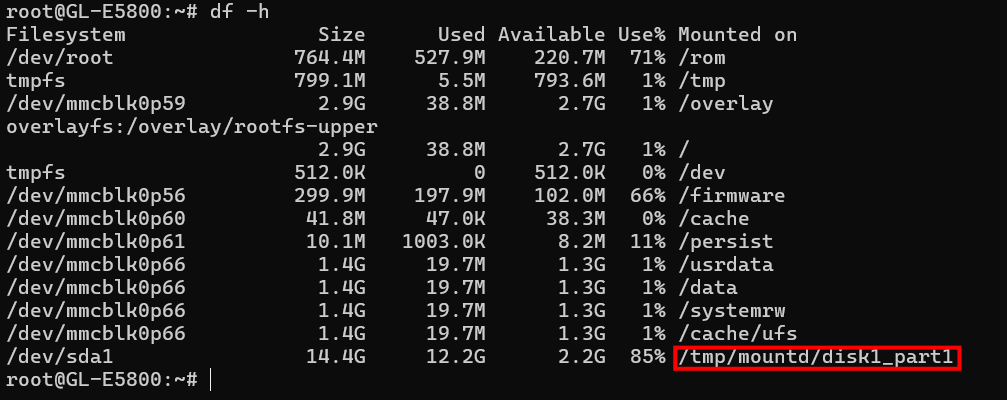
-
Download the cfg configuration file.
cd /etc/ && wget https://fw.gl-inet.com/tools/quectel_tool/4G_5G_2.cfg -
Run the following command to start modem log capture. Replace
/tmp/mountd/disk1_part1with the actual mount path of your USB flash disk.diag_mdlog -u -i -f /etc/4G_5G_2.cfg -o /tmp/mountd/disk1_part1/diag_$(date +%Y%m%d%H%M) & -
Reboot the modem. Replace
<sim_slot>with the number of the currently active SIM card slot (1or2).For example, if SIM card 1 is active:gl_modem -B cpu -U <sim_slot> AT AT+CFUN=0; sleep 1; gl_modem -B cpu -U <sim_slot> AT AT+CFUN=1gl_modem -B cpu -U 1 AT AT+CFUN=0; sleep 1; gl_modem -B cpu -U 1 AT AT+CFUN=1 -
Wait for 3 minutes, then run the following command to stop qlog.
diag_mdlog -k -
You will find a folder on the USB flash disk. It contains files with qLog captured data, which require the Quectel tool for decoding. Please send these files to GL.iNet or Quectel technical support.

GL-X2000
-
Insert a USB flash disk, then run
df -hto get the mount path and record it.The USB flash disk in the following example is mounted at
/tmp/mountd/disk1_part1.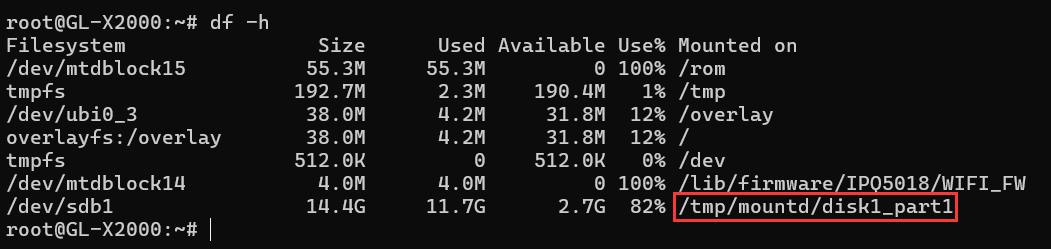
-
Download the cfg configuration file.
cd /etc/ && wget https://fw.gl-inet.com/tools/quectel_tool/default_v15.cfg
-
Download the qlog tool.
cd /usr/bin && wget https://fw.gl-inet.com/tools/quectel_tool/QLog_X2000chmod 775 /usr/bin/QLog_X2000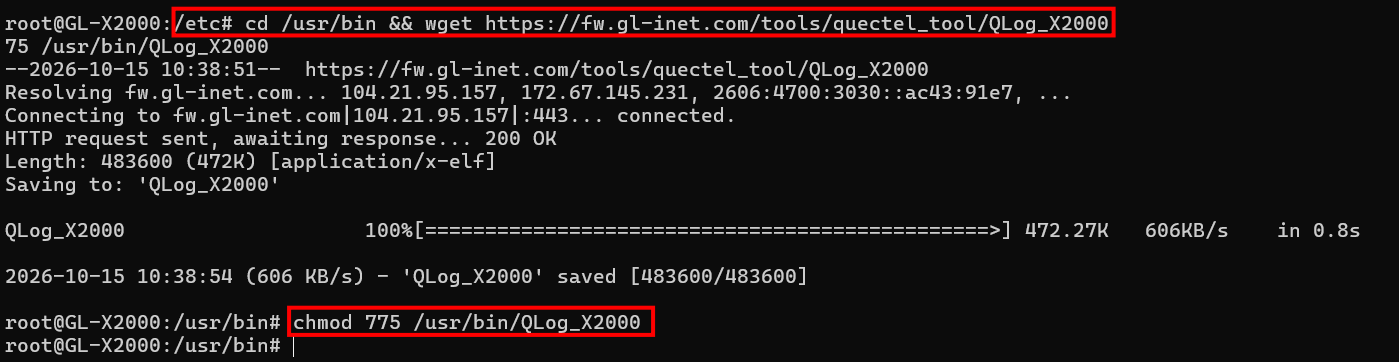
-
Run the following command to start qlog. Replace
/tmp/mountd/disk1_part1with the actual mount path of your USB flash disk.QLog_X2000 -f /etc/default_v15.cfg -s /tmp/mountd/disk1_part1/qlogs_$(date +%Y%m%d%H%M) & -
Reboot the modem.
gl_modem -B 2-1 AT AT+CFUN=0; sleep 1; gl_modem -B 2-1 AT AT+CFUN=1 -
Wait for 3 minutes, then run the following command to stop qlog.
ps | grep qlog | grep -v grep | awk '{print $1}' | xargs kill -9 -
You will find a folder on the USB flash disk. It contains files with qLog captured data, which require the Quectel tool for decoding. Please send these files to GL.iNet or Quectel technical support.

GL-XE300/GL-X750/GL-X300B
-
Insert a USB flash disk, then run
df -hto get the mount path and record it.The USB flash disk in the following example is mounted at
/tmp/mountd/disk1_part1.
-
Run the following commands to download qlog from the GL.iNet server.
cd /usr/bin/ && wget https://fw.gl-inet.com/tools/quectel_tool/qlog-ar9531-sha256-75fe8bchmod 775 qlog-ar9531-sha256-75fe8b -
Run the following command to enable the modem debug mode.
gl_modem AT AT+QCFG=\"dbgctl\",0 -
Run the following command to start qlog. Replace
/tmp/mountd/disk1_part1with the actual mount path of your USB flash disk.qlog-ar9531-sha256-75fe8b -s /tmp/mountd/disk1_part1/qlogs_$(date +%Y%m%d%H%M) & -
Reboot the modem.
gl_modem AT AT+CFUN=0; sleep 1; gl_modem AT AT+CFUN=1 -
Wait for 3 minutes, then run the following command to stop qlog.
ps | grep qlog | grep -v grep | awk '{print $1}' | xargs kill -9 -
You will find a folder on the USB flash disk. It contains files with qLog captured data, which require the Quectel tool for decoding. Please send these files to GL.iNet or Quectel technical support.

GL-X3000/GL-XE3000
-
Insert a USB flash disk, then run
df -hto get the mount path and record it.The USB flash disk in the following example is mounted at
/tmp/mountd/disk1_part1.
-
Run the following commands to download qlog from the GL.iNet server.
cd /etc/ && wget https://fw.gl-inet.com/tools/quectel_tool/default_v15.cfgcd /usr/bin/ && wget https://fw.gl-inet.com/tools/quectel_tool/qlog-mtk7981a-sha256-78dda4chmod 775 qlog-mtk7981a-sha256-78dda4 -
Run the following command to start qlog. Replace
/tmp/mountd/disk1_part1with the actual mount path of your USB flash disk.qlog-mtk7981a-sha256-78dda4 -f /etc/default_v15.cfg -s /tmp/mountd/disk1_part1/qlogs_$(date +%Y%m%d%H%M) & -
Reboot the modem.
gl_modem -B 0001:01:00.0 SAT sp AT+CFUN=0; sleep 1; gl_modem -B 0001:01:00.0 SAT sp AT+CFUN=1 -
Wait for 3 minutes, then run the following command to stop qlog.
ps | grep qlog | grep -v grep | awk '{print $1}' | xargs kill -9 -
You will find a folder on the USB flash disk. It contains files with qLog captured data, which require the Quectel tool for decoding. Please send these files to GL.iNet or Quectel technical support.

Still have questions? Visit our Community Forum or Contact us.