FAQ sulla risoluzione dei problemi di connessione Internet
D1. Cosa devo fare se non riesco ad accedere a Internet?
Segui i passaggi seguenti per una risoluzione di base dei problemi.
-
Controlla il collegamento fisico.
Assicurati che il cavo Ethernet sia collegato saldamente tra la porta WAN del router e il dispositivo a monte, ad esempio modem, ONT o presa Ethernet. Controlla i LED del dispositivo a monte e verifica che ci sia trasmissione attiva.
-
Riavvia i dispositivi.
Spegni il dispositivo a monte, ad esempio il modem, e il router. Attendi 1-2 minuti. Quindi accendi prima il modem, aspetta che sia completamente online e poi accendi il router.
-
Controlla l'indirizzo IP WAN.
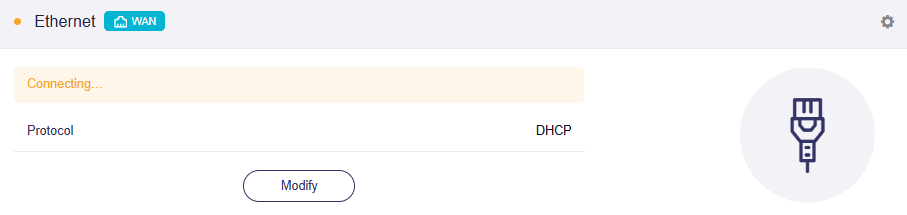
Accedi al pannello di amministrazione web del router e vai alla sezione INTERNET -> Ethernet. Se rimane bloccato nello stato di connessione, come mostrato di seguito, il problema potrebbe dipendere da DHCP, binding MAC o dalla necessità di una VLAN.
Contatta il tuo ISP e verifica se per l'accesso a Internet sono necessari PPPoE username, PPPoE password e VLAN ID.
Nel frattempo, verifica anche se il tuo ISP ha configurato in precedenza il MAC binding sul modem/ONT.
D2. Quando dovrei clonare un indirizzo MAC?
Alcuni ISP associano la tua connessione broadband all'indirizzo MAC del primo dispositivo collegato, in genere il vecchio router o il computer. Quando sostituisci il router, dovrai clonare l'indirizzo MAC per ripristinare l'accesso a Internet.
Segui i passaggi seguenti per clonare un indirizzo MAC sul router GL.iNet.
-
Annota l'indirizzo MAC del vecchio router, oppure del computer precedentemente associato alla tua connessione broadband.
-
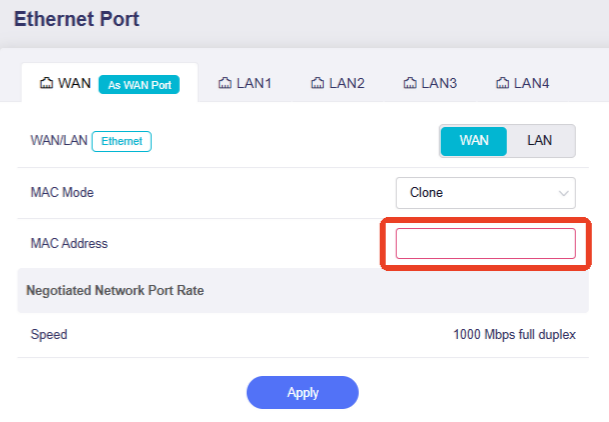
Accedi al pannello di amministrazione web del router e vai su NETWORK -> Ethernet Port (in alcune versioni del firmware chiamato Port Management). Imposta MAC Mode su Clone o Manual, inserisci manualmente l'indirizzo MAC e poi fai clic su Apply.
-
Riavvia il modem, cioè il dispositivo a monte.
D3. Quando devo configurare un VLAN ID?
Alcuni ISP richiedono il tagging VLAN per l'autenticazione Internet o per la separazione del traffico, in particolare con connessioni in fibra e IPTV. Contatta il tuo ISP e verifica se è richiesto un VLAN ID.
Segui i passaggi seguenti per configurare il VLAN ID.
-
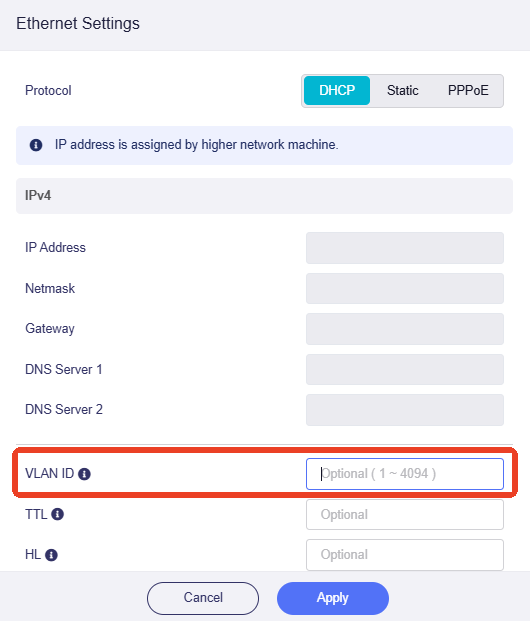
Accedi al router e vai alla sezione INTERNET -> Ethernet. Fai clic su Modify.
-
Inserisci il VLAN ID fornito dal tuo ISP, quindi fai clic su Apply.
D4. Cosa succede se ancora non funziona?
Se il problema persiste, prova a collegare direttamente un PC o un laptop al modem e verifica se hai accesso a Internet.
Se non hai accesso a Internet, il problema potrebbe dipendere dal tuo ISP. Contatta il tuo ISP per ulteriore assistenza.
Se invece hai accesso a Internet, il problema potrebbe essere legato alla configurazione del router. Contatta il nostro supporto tecnico all'indirizzo support@gl-inet.com e fornisci le seguenti informazioni:
- Modello del router
- Passaggi di risoluzione dei problemi che hai già provato
- Nome del tuo ISP
- Qualsiasi altra informazione che possa aiutarci ad assisterti
Informazioni sugli ISP
Di seguito trovi informazioni specifiche per area geografica sugli ISP, raccolte da GL.iNet da feedback dei clienti, forum e risorse OpenWRT, solo come riferimento.
| Country/Region | ISP | Connection Type | VLAN ID | MAC Clone Required | Additional Requirements |
|---|---|---|---|---|---|
| United States | AT&T Fiber | DHCP (IP Passthrough) | N/A | No | E' necessario abilitare IP Passthrough; richiesto il bypass dell'autenticazione EAP |
| United States | Spectrum | DHCP | N/A | Yes (in some areas) | Associazione MAC rigorosa (riavvio del modem necessario) |
| United States | Verizon Fios | DHCP | N/A | No | |
| United States | Comcast Xfinity | DHCP | N/A | Yes (common) | E' necessario riavviare il modem quando si cambia router (rilascio MAC) |
| United States | Cox Communications | DHCP | N/A | Yes | E' necessario riavviare il modem quando si cambia router (rilascio MAC) |
| United States | Frontier Fiber | DHCP | N/A | No | |
| United States | CenturyLink / Lumen | PPPoE | 201 | No | Le VLAN sono richieste in alcune aree. |
| Canada | Bell Canada Fibe | PPPoE | 35 | No | |
| Germany | Deutsche Telekom | PPPoE | 7 | No | VLAN 7 obbligatoria per internet; credenziali PPPoE richieste |
| Germany | Vodafone (Kabel) | DHCP | N/A | Yes (sometimes) | Potrebbe essere applicata l'associazione MAC; riavviare il modem dopo il cambio del router |
| Germany | 1&1 / O2 (Telekom line) | PPPoE | 7 | No | VLAN 7 obbligatoria per internet |
| Germany | DNS:NET | PPPoE | 37 | No | |
| Germany | o2(UGG) | PPPoE | 7 | No | |
| United Kingdom | BT Broadband | PPPoE | 101 | No | VLAN 101 richiesta; accesso PPPoE necessario |
| United Kingdom | Sky Broadband | DHCP (Option 61) | 101 | No | Richiede DHCP Option 61 (identificatore client) |
| United Kingdom | Virgin | DHCP | N/A | Yes | Il modem e' in modalita bridge e richiede la clonazione MAC. |
| France | Orange | DHCP / PPPoE | 832 | No | VLAN 832 richiesta; potrebbe richiedere l'autenticazione Option 90 |
| France | Free (Freebox) | DHCP | N/A | No | |
| France | Bouygues Telecom | DHCP | 100 | Yes | Clonare il MAC del Bbox |
| Spain | Movistar | PPPoE | 6 | No | VLAN 6 (internet), VLAN 2 (IPTV), VLAN 3 (VoIP) |
| Spain | DIGI | PPPoE | 20 | No | |
| Spain | Orange | DHCP | 832/835 | No | Le VLAN possono variare in base alla regione |
| Italy | TIM | PPPoE | 835 | No | VLAN 835 richiesta |
| Italy | Aruba | PPPoE | 835 | No | |
| Netherlands | KPN | DHCP | 6 | No | VLAN 6 richiesta per internet |
| Netherlands | Tweak | DHCP | 34 | Yes | Clonazione del MAC di Experia Box |
| Netherlands | Telfort / Oxxio / Tweak | DHCP (IPoE) | 34 | No | |
| Netherlands | Odido | DHCP | 300 | No | |
| Belgium | EDPnet | PPPoE | 10 | No | |
| Bosnia and Herzegovina | BH Telecom | PPPoE | 100 | No | |
| Croatia | Terrakom | PPPoE | 905 | No | |
| Czech Republic | O2 | PPPoE | 848 | No | |
| Cyprus | Epic | PPPoE | 35 | No | |
| Cyprus | Cyta | PPPoE | 42 | No | |
| Cyprus | Cablenet | PPPoE | 42 | No | |
| Cyprus | Primetel | PPPoE | 42 | No | |
| Poland | Orange Polska | PPPoE | 35 | No | VLAN 35 richiesta |
| Poland | T-mobile | PPPoE | 35 | No | |
| Ireland | Vodafone SIRO | PPPoE | 10 | No | |
| Ireland | Pure Telecom | PPPoE | 10 | No | |
| Austria | A1 Telekom | PPPoE | 2 | No | |
| Austria | Fonira | PPPoE | 31 | No | |
| Türkiye | Turknet | PPPoE | 35 | No | |
| Türkiye | Turk Telekom | PPPoE | 35 | No | |
| Türkiye | Turkcell Superonline | PPPoE | N/A | Yes | |
| Türkiye | Turksat Kablonet | DHCP/PPPoE | N/A | No | |
| Greece | Cosmote | PPPoE | 835 | No | |
| Greece | Nova | PPPoE | 835 | Yes | |
| Greece | DEI/PPC | DHCP | 835 | No | |
| Japan | NTT (FLET'S) | PPPoE / IPoE (MAP-E) | N/A | No | IPoE richiede un router compatibile con MAP-E/DS-Lite |
| Japan | SoftBank Hikari | PPPoE / IPoE | N/A | No | Servizio BBIX IPoE comunemente utilizzato |
| India | Airtel | PPPoE / DHCP | N/A | No | In alcune regioni e' richiesto PPPoE |
| India | JioFiber | DHCP | N/A | No | ONT bloccato in molti casi |
| Singapore | Singtel | PPPoE | 10 | No | VLAN 10 richiesta; IPTV su VLAN separata |
| Singapore | StarHub | DHCP | N/A | No | Connessione basata su DHCP |
| Australia | NBN (various ISPs) | PPPoE / DHCP | 2 (common) | Yes | VLAN 2 comune ma dipendente dall'ISP |