Connecting the 10G SFP+ Port on Flint 4
Flint 4 (GL-BE14000) has a 10G SFP+ port that can operate in either WAN or LAN mode. The port supports multiple types of SFP+ modules and cables for fiber-optic and copper Ethernet connections, including long-distance fiber links, conventional twisted-pair cabling, and advanced PON fiber termination.
This article describes three connection options for the SFP+ port on Flint 4 (GL-BE14000), including their use cases, connection topologies, advantages and disadvantages, precautions, and compatible models.
Solution 1. Optical Transceiver + Fiber Cable
1.1 Scenarios
This solution is intended for long-distance, reliable 10G Ethernet connections. Typical uses include:
- Connecting to an ISP's 10G fiber Ethernet uplink for high-speed residential or commercial broadband access.
- Deploying long-distance indoor or outdoor network links, such as connecting Flint 4 to a remote 10G switch, cabling between floors in a home, or deploying a small-office backbone network.
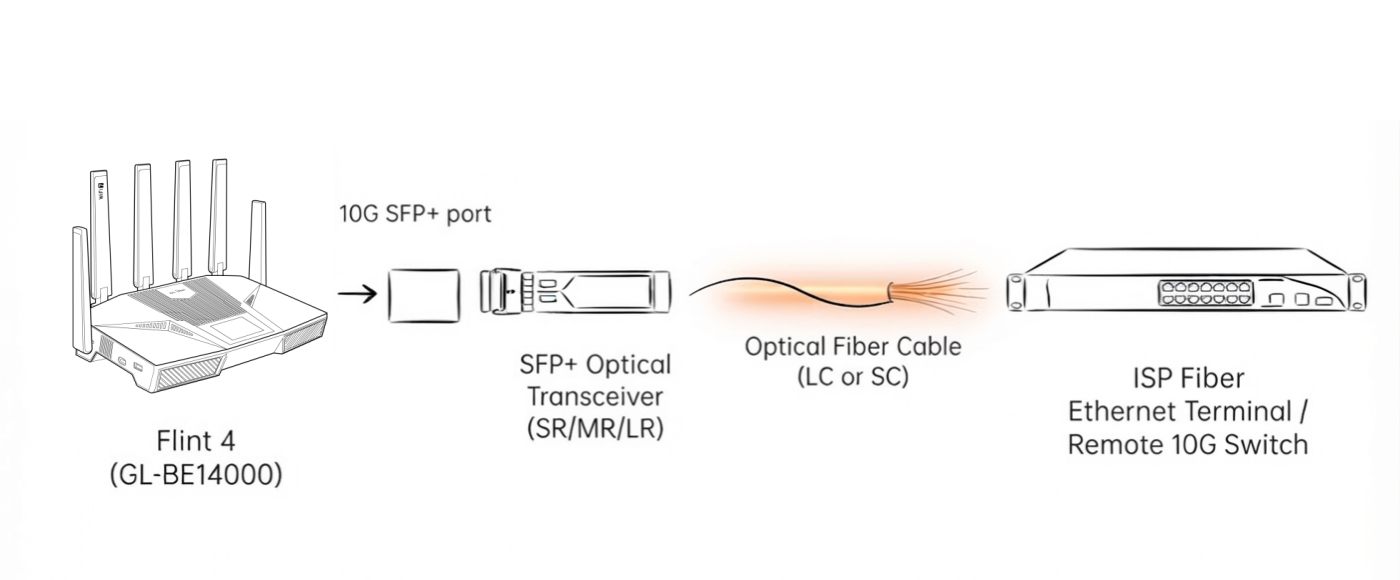
1.2 Topology
Flint 4 10G SFP+ port → Standard 10G SFP+ optical transceiver (SR/MR/LR) → Fiber-optic cable → Remote 10G network switch / ISP fiber Ethernet terminal
1.3 Pros and Cons
The table below evaluates key performance and usability aspects of the optical transceiver and fiber-optic cable option, with star ratings and detailed notes for reference:
| Metric | Star Rating | Remarks |
|---|---|---|
| Transmission Distance | ★★★★★ | Supports distances of up to 300 m over multimode fiber or more than 10 km over single-mode fiber, making it suitable for long-range connections. |
| Interference Resistance | ★★★★★ | Fiber-optic transmission is immune to electromagnetic interference, static electricity, and crosstalk, ensuring stable operation in complex environments. |
| Energy Efficiency | ★★★★★ | Offers low power consumption and heat output. Its mature chipset design supports stable, long-term operation under full load without overheating. |
| Compatibility | ★★★★★ | Officially supported and compliant with standard 10G Ethernet protocols; no firmware adaptation is required. |
| Ease of Deployment | ★★★☆☆ | Requires knowledge of basic fiber connection requirements. Improper handling may cause signal attenuation, so deployment is more complex than with copper cabling. |
| Cost | ★★★☆☆ | Requires additional optical transceivers and fiber cables, resulting in a higher overall cost than traditional twisted-pair solutions. |
1.4 Precautions
-
PON modules cannot be used with this option.
-
Select the appropriate single-mode or multimode optical modules and fiber cables for the required transmission distance to avoid reduced network speeds or link failure.
-
This option supports only ISP 10G Ethernet-over-fiber services and cannot connect directly to traditional GPON/XGS-PON residential fiber lines.
1.5 Compatible Models
The following standard optical transceivers have been tested by GL.iNet or community members and found to be compatible with Flint 4. This list is for reference only.
| Model | Tester |
|---|---|
| ipolex AXS85-192-M3 10GBase-SR 850nm 300m | GL.iNet |
| ipolex CAB-10GSFP-P1.5M 10G SFP+ DAC 1.5m, 30AWG | Community member |
| QSFPTEK QT-SFP+SR CO SFP+ 10G 850nm 300m | GL.iNet |
| QSFPTEK QT-SFP-2.5G-0401D SFP 2.5G 850nm 300m | GL.iNet |
| QSFPTEK QT-SFP+-SR CO SFP+ 10G 850nm 300m | Community member |
| QINIYEK BJ-SFP+SR AR 10G 850nm 300m | GL.iNet |
| QINIYEK BJ-SFP+-SR CI SFP+ 10G 850nm 300m | Community member |
| XZSNET SFP10G-SR | GL.iNet |
| 10Gtek AXS85-192-M3 10GBase-SR 850nm 300m | GL.iNet |
| 10Gtek AZS85-192-M1 25G SFP28-SR 850nm 100m | GL.iNet |
| 10Gtek ASF85-24-X2-D 1000Base-SX 850nm 550m | GL.iNet |
| 10Gtek ASF85-24-X2-D 1.25G SFP-SX 850nm 550m | GL.iNet |
| FS Cisco SFP-10G-SR Compatible 10GBASE-SR | GL.iNet |
| FS Juniper EX-SFP-10GE-SR 10GBASE-SR SFP+ | GL.iNet |
| FS Arista SFP-10G-SR 10GBASE-SR SFP+ | GL.iNet |
| FS Brocade 10G-SFPP-SR 10GBASE-SR SFP+ | GL.iNet |
| HUAWEI 6G-850nm-120m-MM-SFP+ MTRS-6A11-01 | GL.iNet |
| HUAWEI 2.5G-1310nm-SM-ESFP MXPD-483II | GL.iNet |
| netLINK 10G/850nm/300m/DDM HTB-10G-SR | GL.iNet |
| H!Fiber ASF85-24-X2-D 1000Base-SX 850nm 550m | GL.iNet |
| Cisco GLC-SX-MMD 10-2626-01 CLASS 1 21CFR1040.10 LN#50 | Community member |
Solution 2. SFP+ to RJ45 Module (SFP-10G-T)
2.1 Scenarios
The SFP-10G-T module converts the SFP+ slot into a standard RJ45 twisted-pair interface, making it suitable for short-distance 10G networks that use conventional Ethernet cables. Typical applications include connecting Flint 4 to a nearby 10G switch or NAS, adding a 10G RJ45 port without installing fiber, and building a high-speed home or SOHO LAN with existing twisted-pair cabling. This option is suitable for users who need 10G Ethernet but do not have fiber cabling.
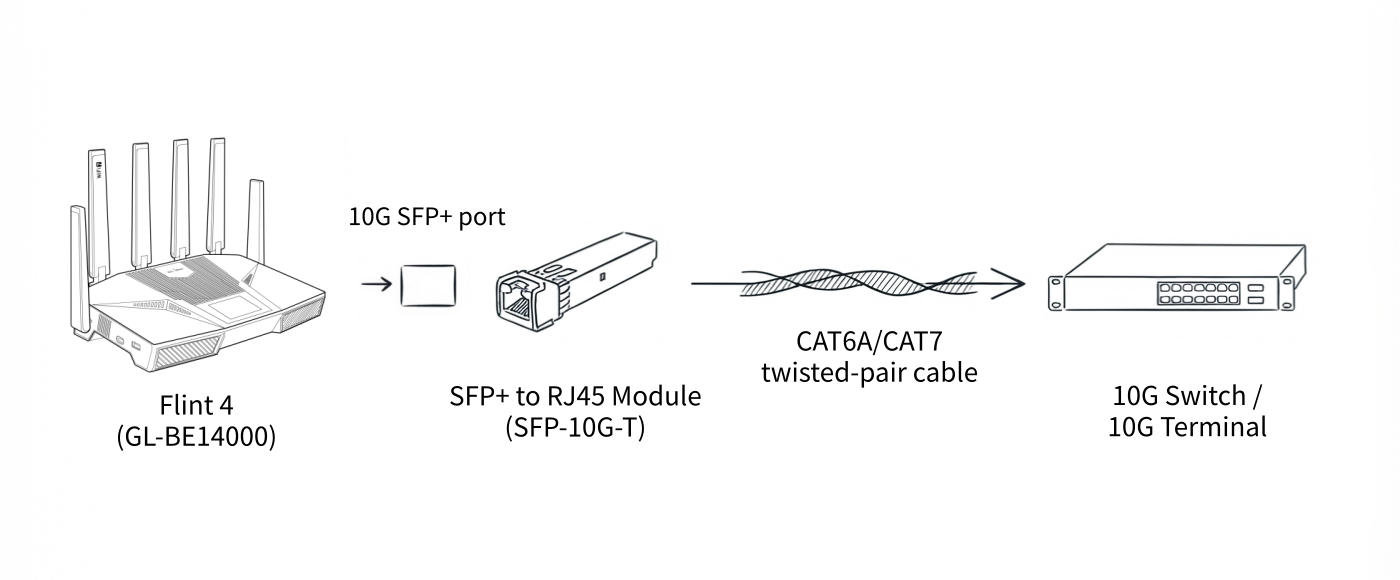
2.2 Topology
Flint 4 10G SFP+ port → SFP+ to RJ45 module (SFP-10G-T) → CAT6A/CAT7 twisted-pair cable → 10G switch / 10G wired terminal device
2.3 Pros and Cons
The table below evaluates key performance and usability aspects of the SFP+ to RJ45 (SFP-10G-T) module option, with star ratings and detailed notes for reference:
| Metric | Star Rating | Remarks |
|---|---|---|
| Transmission Distance | ★★☆☆☆ | The PHY limits the stable transmission distance to 30 m, making the module unsuitable for long-distance cabling. |
| Interference Resistance | ★★★☆☆ | Twisted-pair connections can be susceptible to electromagnetic interference and crosstalk in complex cabling environments. |
| Energy Efficiency | ★★☆☆☆ | Consumes more power and generates significant heat under sustained high loads. Adequate heat dissipation is required for long-term operation. |
| Compatibility | ★★★★☆ | Compatible with standard 10G RJ45 devices. CAT6A or CAT7 cabling is required for stable 10G transmission. |
| Ease of Deployment | ★★★★★ | Offers plug-and-play deployment with no optical-path configuration required and works with conventional Ethernet cabling. |
| Cost | ★★★★☆ | Can reuse existing RJ45 cabling without installing fiber, although a separate 10GBASE-T module is required. |
2.4 Precautions
-
Use CAT6A or higher-category Ethernet cables for stable 10G transmission. Lower-category cables may reduce speeds or cause packet loss.
-
Keep the cable length within 30 m. Longer cables may cause link instability, reduced speeds, or disconnections.
-
Provide adequate airflow around the SFP-10G-T module to prevent failures caused by overheating.
2.5 Compatible Models
The following SFP+ to RJ45 modules have been tested by GL.iNet or community members and found to be compatible with Flint 4. This list is for reference only.
| Model | Tester |
|---|---|
| ipolex 10G Base-T RJ45 30m | GL.iNet |
| ipolex ASF-GE-T 1000Base-T SFP RJ-45 100m | GL.iNet |
| QSFPTEK QT-SFP-10G-T UB RJ45 30m | GL.iNet |
| XZSNET-SFP10G-T RJ45 30m | GL.iNet |
| 10Gtek ASF-10G-T RJ45 30m | GL.iNet |
| 10Gtek ASF-2G-T 2.5GBase-T SFP RJ-45 100m | GL.iNet |
| 10Gtek ASF-10G2-T 1G/2.5G/5G/10GBase-T RJ-45 30m | Community member |
| HUAWEI SFP-1000BASE-T-RJ45-100m SFP-1000Base-T | Community member |
| Xicom SFP-2.5G-T 100/1000M/2.5G RJ45 100m | Community member |
| ONTI OBT-C2GE-R10 SFP 2500Base-TX RJ45 100m | Community member |
| H!Fiber ASF-GE2-T 10/100/1000Base-T SFP SGMII RJ-45 100m | GL.iNet |
Solution 3. PON-ONU SFP+ Stick
3.1 Scenarios
The PON-ONU SFP+ stick provides the functions of an ONU optical modem, allowing Flint 4's SFP+ port to terminate traditional GPON/XGS-PON residential fiber lines directly. This option eliminates the need for a separate external optical modem by combining fiber access and routing in one device. It is intended for advanced, enthusiast-level deployments, particularly for users who want to reduce the number of devices in their home network and connect the router directly to an ISP's PON fiber line.
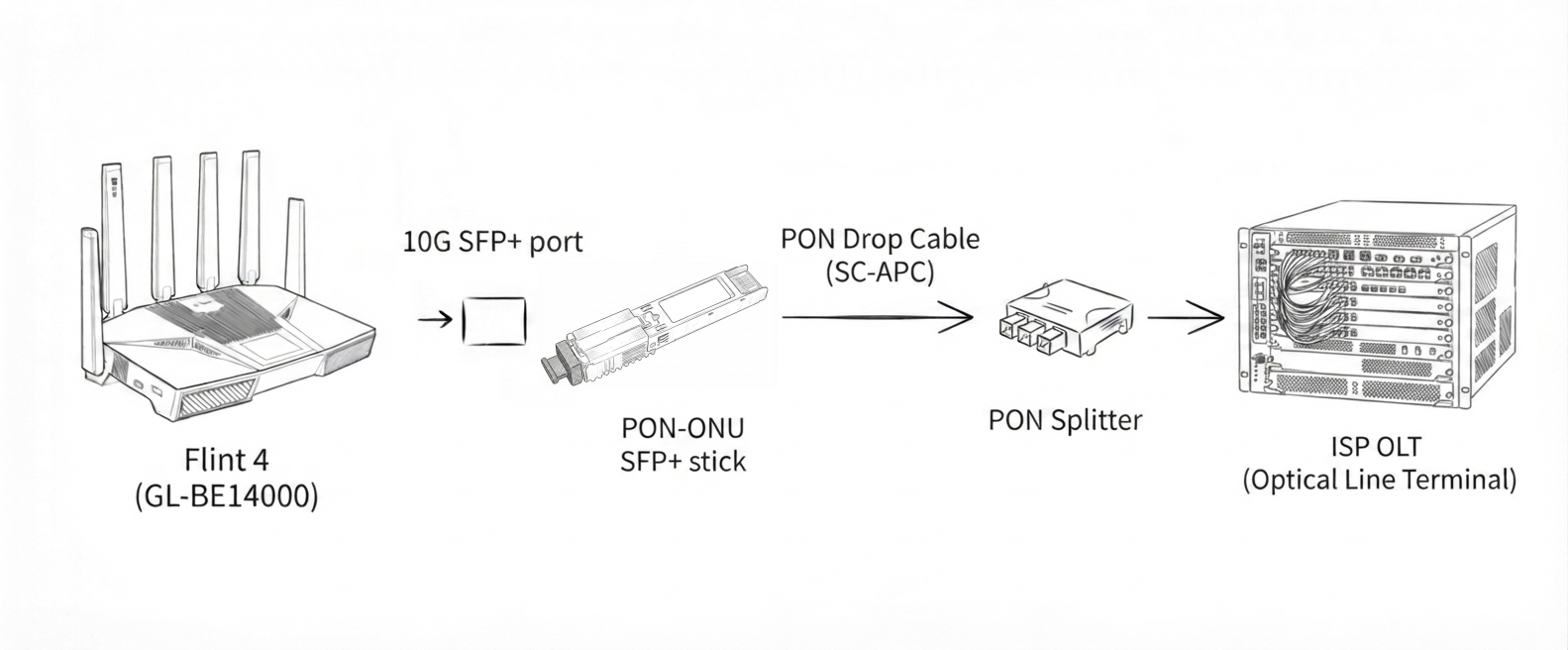
3.2 Topology
Flint 4 10G SFP+ port → PON-ONU SFP+ stick → ISP GPON/XGS-PON fiber line (including drop cable, PON splitter, and ISP OLT)
3.3 Pros and Cons
The table below evaluates key performance and usability aspects of the PON-ONU SFP+ stick option, with star ratings and detailed notes for reference:
| Metric | Star Rating | Remarks |
|---|---|---|
| Transmission Distance | ★★★★★ | Supports standard PON transmission distances for residential and typical commercial fiber access. |
| Interference Resistance | ★★★★★ | Fiber-optic transmission provides strong interference immunity and signal stability in accordance with common PON fiber access standards. |
| Energy Efficiency | ★★☆☆☆ | Generates significant heat during high-speed operation. Auxiliary cooling is required to avoid performance degradation and disconnections. |
| Compatibility | ★★☆☆☆ | This is an unofficial, enthusiast-oriented solution. Compatibility depends on the ISP's whitelist and the stick model, and long-term operation may be unstable. |
| Ease of Deployment | ★★☆☆☆ | Requires prior confirmation from the ISP, SN/PLOAM authentication configuration, and adequate cooling. Deployment is relatively complex. |
| Cost | ★★★☆☆ | Eliminates the cost of a separate optical modem but may affect services such as IPTV and voice and does not include official technical support. |
3.4 Precautions
-
Confirm ISP permission in advance: Ask the ISP whether customer-owned third-party ONU hardware is allowed on its PON network, and obtain the required authentication parameters, including the SN registration code and PLOAM password.
-
Heat dissipation is mandatory: Provide auxiliary cooling for the PON-ONU stick to prevent performance degradation, packet loss, and disconnections caused by high temperatures.
-
No service guarantee: GL.iNet does not provide technical support for this option. Issues such as network instability, speed fluctuations, or problems with value-added services are not covered by official firmware or after-sales support.
-
Module whitelisting rules vary by ISP. Confirm which PON stick models the ISP supports before purchase.
3.5 Compatible Models
The following PON-ONU SFP+ sticks have been tested by GL.iNet or community members and found to be compatible with Flint 4. This list is for reference only.
| Model | Tester |
|---|---|
| HUAWEI MA5671A 2.5G ONU stick | GL.iNet |
| NOKIA GPON ONT SFP Class I Laser G-010S-A | Community member |
Still have questions? Visit our Community Forum or contact us.