Ethernet Port
The content on this page is based on firmware version v4.7-4.9. If your device is running a different firmware version, use the selector below to switch to the corresponding guide.
On the left side of the web Admin Panel, go to NETWORK -> Ethernet Port or Port Management.
It allows you to manage Ethernet port roles (WAN/LAN) and view port details such as MAC address and negotiated speed.
WAN
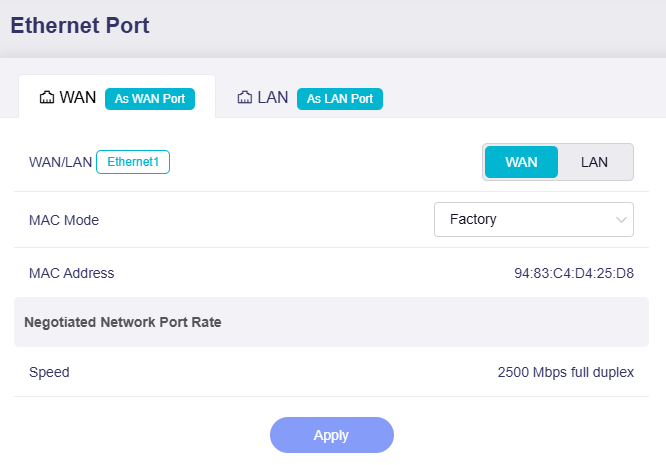
This section displays the port role (WAN or LAN), MAC address, and negotiated rate.
-
WAN/LAN: The current operating mode of the physical WAN port. You can set it to LAN as needed.
-
MAC Mode: Defaults to Factory Mode. You can switch it to Clone Mode or Random Mode.
-
MAC Address: The MAC address of the WAN interface.
-
Negotiated Network Port Rate: The negotiated link speed of the WAN interface, displayed only when a valid link is detected.
LAN
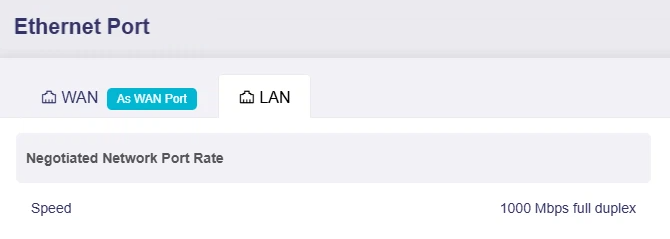
This section displays the negotiated speed of the LAN port. It is only displayed when a valid link is detected.
Some models support switching LAN 1 to a WAN port for dual-Ethernet WAN scenario. Click Dual-Ethernet WAN for details.
Dual-Ethernet WAN
The Dual-Ethernet WAN feature lets you switch a default LAN Ethernet port to a secondary WAN port for dual Ethernet internet access, providing reliable backup connectivity and supporting bandwidth aggregation (where compatible) for bandwidth-heavy workloads. It also lets you connect to two independent networks (e.g., work and personal) simultaneously, enhancing flexibility without extra hardware.
Supported Models
- GL-BE14000 (Flint 4)
- GL-BE10000 (Slate 7 Pro)
- GL-MG1300 (Mango 2)
- ※GL-E5800 (Mudi 7)
- GL-MT3600BE (Beryl 7)
- GL-MT5000 (Brume 3)
- GL-BE6500 (Flint 3e)
- GL-BE9300 (Flint 3)
- GL-BE3600 (Slate 7)
- GL-X2000 (Spitz Plus)
- GL-MT6000 (Flint2)
- GL-X3000 (Spitz AX)
- GL-XE3000 (Puli AX)
Note: GL-E5800 (Mudi 7) is equipped with one Ethernet port (default LAN, can be switched to WAN) and an OTG-enabled USB-C port. To add a second Ethernet port for Dual-Ethernet WAN, please connect a separately sold USB‑C‑to‑Ethernet adapter to the USB‑C port.
Unsupported Models
- GL-B3000 (Marble)
- GL-AX1800 (Flint)
- GL-MT2500/GL-MT2500A (Brume 2)
- GL-MT3000 (Beryl AX)
- GL-AXT1800 (Slate AX)
- GL-SFT1200 (Opal)
- GL-A1300 (Slate Plus)
- GL-MT1300 (Beryl)
- GL-E750/E750V2 (Mudi)
- GL-AR750S (Slate)
- GL-XE300 (Puli)
- GL-X750 (Spitz)
- GL-MT300N-V2 (Mango)
- GL-AR300M Series (Shadow)
- GL-B1300 (Convexa-B)
- GL-X300B (Collie)
Follow the steps below to switch a LAN port to a WAN port.
-
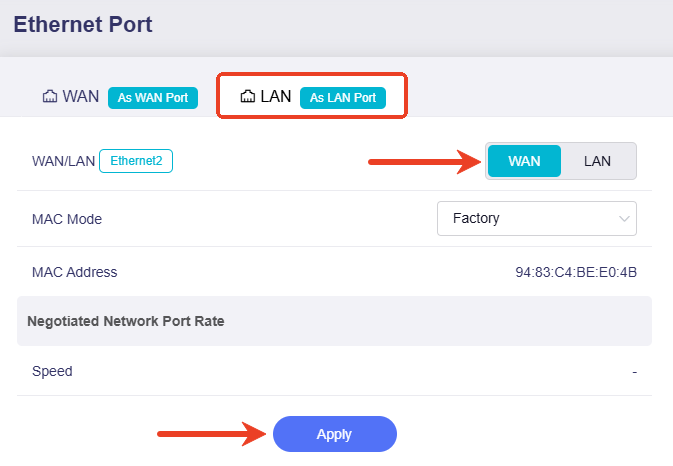
On the Port Management or Ethernet Port page, click the LAN tab and switch the port role to WAN, then click Apply.
-
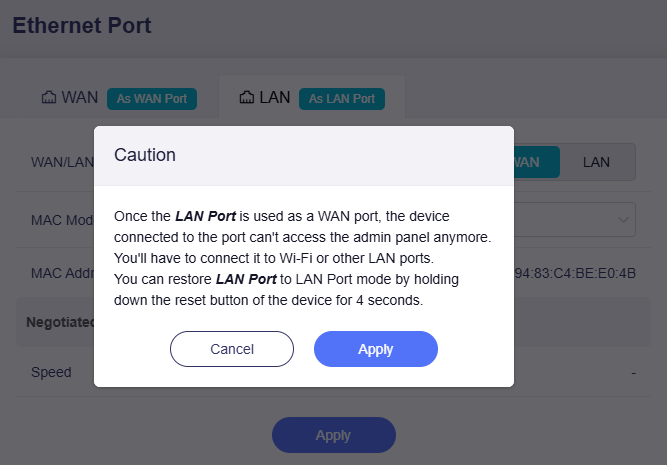
In the pop-up window, click Apply.
-
The selected port will now operate as a WAN port. You may proceed to configure Multi-WAN here.
Still have questions? Visit our Community Forum or Contact us.